step 1
Install
Add the bot and allow it to post. It automatically creates a durable community profile and referral code.
Meme communities, collections, and creators can install Hood.Rich Ninja, choose from the approved box catalog, and give members a one-tap private launch path. Telegram identity, wallet, activity, and community attribution carry through automatically.
Add the bot and allow it to post. It automatically creates a durable community profile and referral code.
A Telegram admin runs /setup to show or hide approved boxes, star one as the featured launch box, and attach the project’s HTTPS landing page.
Run /hoodrich to post the member card. Openings are attributed to the community and appear on its own leaderboard.
Post this guide in your announcement channel before launch. Members open the private bot, connect or create their Hood.Rich identity, choose Stars or existing USDG, and receive prizes in the linked stash.
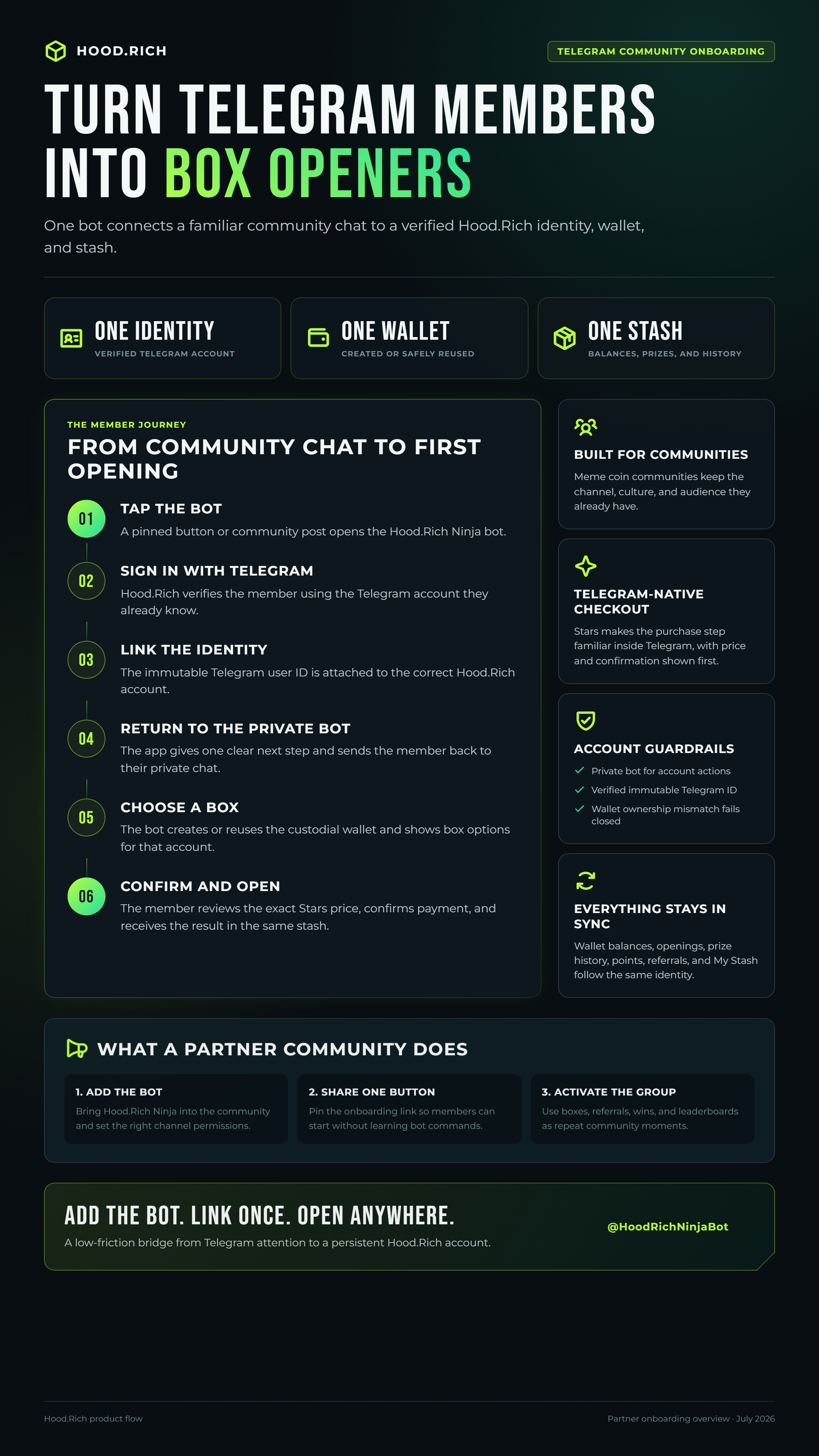
After adding the bot, promote it to administrator. In a group, allow it to post messages and delete messages. In a channel, allow it to post messages. The bot cannot grant these permissions to itself; once enabled, run /setup and tap Post member launch card.
Partner menus select from Hood.Rich products that are already approved and configured on-chain. A new collection or custom prize model must be onboarded into the Hood.Rich catalog before it can be offered through the bot.